Accessibility operations

Accessibility operations for teams who ship

Find it, assign it, verify it, prove it. Scan public and authenticated journeys, coordinate fixes, re-check changes, and keep current evidence in one workspace.

Automated checks cover only part of WCAG and EN 301 549. Manual review remains essential.

We check one page per free scan.
Standard

Not sure? Start with Global Coverage, or pick the law/standard that matches your audience.

Most websites
US public accommodation
Federal contractors
Ontario organizations
EU digital services
EU ICT standard

Automated checks cover part of WCAG; the rest needs manual review.

Built for the teams that get accessibility work done

Start with the job closest to yours. Each path uses capabilities available in the product today.

Agency

Run the same scan, remediation, re-check, and handover workflow across a client portfolio.

See it for agencies

E-commerce

Review product, cart, checkout, payment, and account journeys without adding an overlay.

See it for e-commerce

Product team

Turn rendered-page findings into engineering work and watch releases for detected regressions.

See it for product teams

One workflow from finding to evidence

The objects stay connected as work moves from an automated finding to a reviewed draft.

  1. Step 1Find itScan public pages, saved sites, and configured journeys.
  2. Step 2Assign itTrack the rule and send it to GitHub or Jira.
  3. Step 3Verify itRe-scan affected pages and compare a completed run.
  4. Step 4Prove itKeep review evidence and prepare a working statement draft.

Real artefacts, shown as honest examples

These are authored examples of shipped formats, not live customer data and not compliance verdicts.

Example

Issue assignment

A tracked automated finding can be sent to GitHub or Jira with its rule and source evidence.

Button has no accessible name Rule: button-name · Serious Status: In progress
How GitHub issue sync works
Example

Authenticated journey re-check

A configured journey can scan checkpoints behind sign-in and keep completed checkpoint findings.

Journey: Checkout Last re-check: completed Checkpoints: cart → login → payment
See the SaaS workflow
Draft

Accessibility statement draft

Current scan and human-review evidence can seed a working draft that still needs review before publication.

Status: Working draft Includes: tested date, methodology, known limitations, feedback channel
How statement drafts work

A picture of every issue

Every finding comes with a screenshot, the problem outlined right on the page.
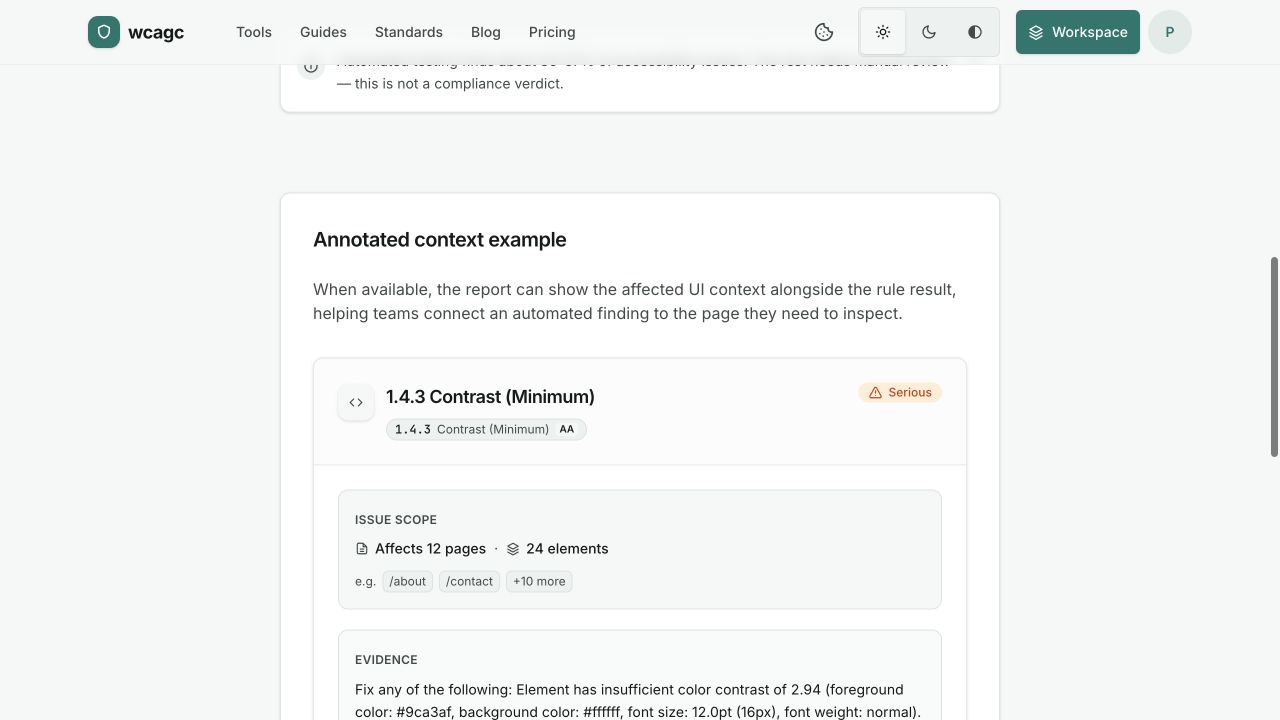
Preview of a wcagc scan report
Preview of a wcagc scan reportOpen sample report

How it actually works

Four steps, and none of them make you compliant on their own. Here’s the part a tool can genuinely help with.

  1. 01

    Scan a page

    Run WCAG 2.1 AA checks on any public page. Findings come back grouped by severity, worst first, and the first scan needs no account.

  2. 02

    Fix it in the code

    Every finding names the element, the rule it breaks, and a fix you can adapt to your own markup.

  3. 03

    Draft the statement

    Turn the results into a draft EN 301 549 statement: where you stand today, and what you’re still working on.

  4. 04

    Watch for regressions

    Re-scan as you ship, so a new barrier turns up in days, not at the next audit.

EAA questions, answered without the panic

What the law actually requires, and where an automated scan stops being enough.

What is the European Accessibility Act?
The European Accessibility Act (EAA) is an EU directive that sets common accessibility requirements for many digital products and services sold in the EU, such as e-commerce, banking, and transport. For the web, those requirements map to EN 301 549, which references WCAG 2.1 level AA.
Who needs to comply?
The EAA applies to a broad range of businesses offering covered products and services to consumers in the EU, including many online stores. Some microenterprises providing services may be exempt. Check your specific obligations with a qualified advisor.
What is the deadline?
The EAA's requirements apply from 28 June 2025 for covered products and services placed on the market after that date, with transitional arrangements for some existing services. Treat the date as a planning milestone. There's time to do this properly.
What is an accessibility statement?
An accessibility statement is a published page describing how accessible your service is, the standard you work to, any known limitations, and how people can reach you for help. It documents your efforts. It is not a certificate.
Does an automated scan prove my site is compliant?
No. Automated testing finds a portion of issues and can't make a conformance decision on its own. A clean automated scan means no automated issues were found, not that a site meets every requirement. Full assessment needs manual review.
How much can automated testing check?
Automated tools reliably catch roughly 30–57% of WCAG success criteria. The rest (like meaningful alt text, logical focus order, and a sensible reading sequence) need a person to judge.

We show our work

No overall score, no black box. Just what we found and exactly where it is on the page.

  • What we test against

    WCAG 2.1 AA, plus the EN 301 549 clauses that map to it.

  • What a scanner can’t do

    Automation catches roughly a third of WCAG issues. We say so up front and flag the rest for a person.

  • Reports you can act on

    Export a report a developer can work through, finding by finding.

Who uses wcagc

Developers

Wire scans into CI so a build breaks when accessibility slips.

Agencies

Hand your clients sites that hold up when someone checks them.

Compliance Teams

Produce the EN 301 549 statement and the evidence your legal team asks for.

Pricing

Plans

Start free, then add the monitoring and evidence workflow your site needs. Cancel anytime.

Showing annual pricing. Starter is €50, Pro is €290, and Agency is €990 per year, billed annually.

Free

Find your biggest issues on one page.

€0

  • Scan one page whenever you need
  • Use PDF and contrast checkers
  • Share a public result

Starter

Scan your whole small site and keep evidence current.

€50/ year

Billed annually: about 2 months free vs monthly.

  • Scan up to 100 pages in one run
  • Track fixes and verify them manually
  • Draft your accessibility statement

Pro

Recommended

Monitor your site, verify fixes, draft your statement.

€290/ year

Billed annually: about 2 months free vs monthly.

  • Monitor every page on your site
  • Verify fixes and track regressions
  • Draft your accessibility statement

Agency

Run accessibility across every client site. Deliver under your brand.

€990/ year

Billed annually: about 2 months free vs monthly.

  • Manage up to 25 client sites
  • Coordinate a team of up to 25
  • Prepare handover-ready evidence

No compliance guarantees. No overlays. No traffic-based surprises.

Ready to go past one page? Scan your whole site and draft a statement.

Create a free account