Guide

ADA compliance, explained

A plain-language guide to the Americans with Disabilities Act and how automated accessibility checks can support, but not replace, human review.

What is the ADA?

The Americans with Disabilities Act (ADA) prohibits discrimination based on disability. While Title III applies to 'places of public accommodation', US courts increasingly rule that this includes websites and mobile apps.

ADA and WCAG

The ADA does not name one technical web standard. WCAG is commonly used to guide accessibility work, but an automated result alone does not decide legal compliance. Confirm obligations that apply to your organization with qualified counsel.

A practical accessibility process

Start with representative pages and real user flows, record automated findings, fix barriers in code, and include keyboard, screen-reader, and content review. This creates useful evidence without turning a scan into a legal verdict.

What automation can do

An automated scanner checks for issues like missing alt text and contrast failures across your whole site quickly. It's the first step in catching clear errors before manual testing.

Check one page for automated accessibility findings.

Start with a page you can inspect

Run an automated check, then use its findings as input to manual accessibility review.
We check one page per free scan.
Standard: Global Coverage
Standard

Not sure? Start with Global Coverage, or pick the law/standard that matches your audience.

Most websites
US public accommodation
Federal contractors
Ontario organizations
EU digital services
EU ICT standard

ADA accessibility questions

What is the ADA?
The Americans with Disabilities Act is a US civil-rights law that prohibits discrimination based on disability. How it applies to a particular digital service depends on the facts and legal context.
Who does Section 508 apply to?
Section 508 applies to US federal agencies' information and communication technology and to relevant work in federal procurement. It is distinct from the ADA.
What is a VPAT or ACR?
A VPAT is a template used to produce an Accessibility Conformance Report (ACR), often requested in procurement. wcagc provides automated findings and statement drafts; it does not produce a VPAT or certify conformance.
Does an automated scan prove compliance?
No. Automated testing finds only some barriers. A clean result means no automated issues were found by that check, not that a site meets every accessibility or legal requirement.
What can automation cover?
Automated checks can find issues such as missing labels, contrast failures, and structural problems. Keyboard behavior, content meaning, and assistive-technology experience need human review.

Built for the teams that get accessibility work done

Start with the job closest to yours. Each path uses capabilities available in the product today.

Agency

Run the same scan, remediation, re-check, and handover workflow across a client portfolio.

See it for agencies

E-commerce

Review product, cart, checkout, payment, and account journeys without adding an overlay.

See it for e-commerce

Product team

Turn rendered-page findings into engineering work and watch releases for detected regressions.

See it for product teams

Real artefacts, shown as honest examples

These are authored examples of shipped formats, not live customer data and not compliance verdicts.

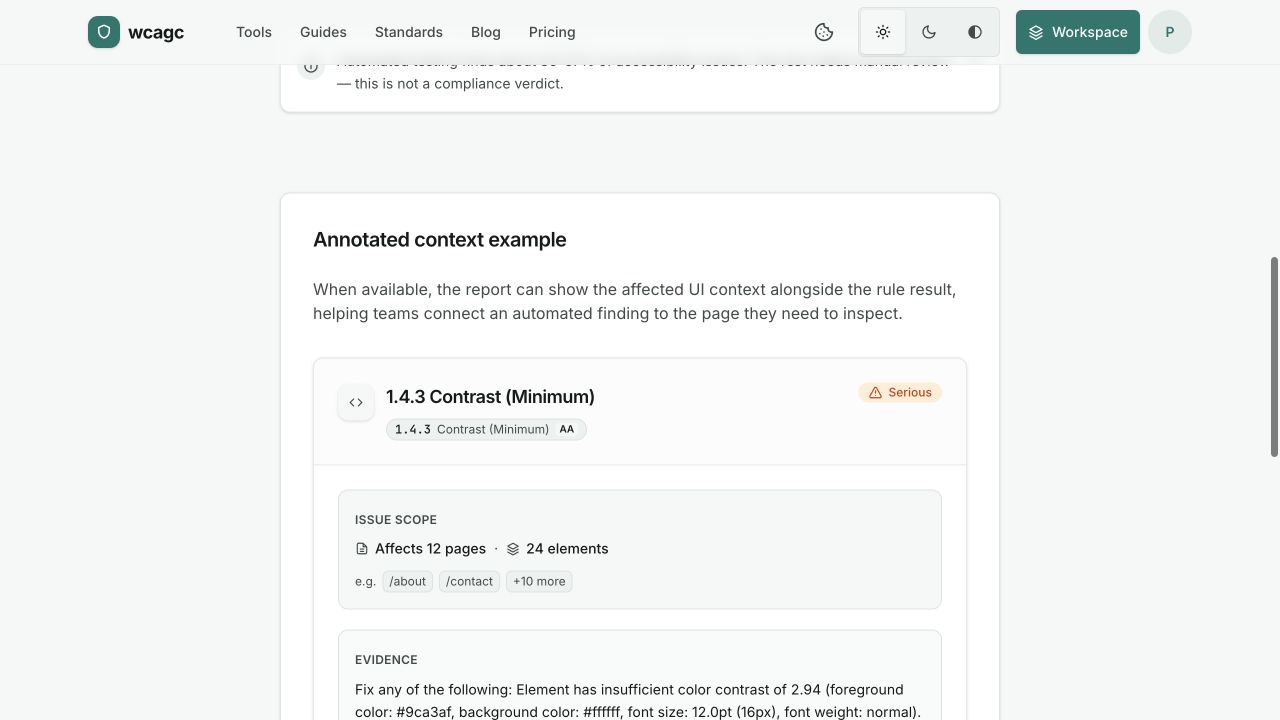
Evidence that stays connected to the work

Keep the tested page, automated findings, and next steps visible to your team.

Preview of a wcagc scan report
Preview of a wcagc scan reportOpen sample report

How it actually works

Four steps, and none of them make you compliant on their own. Here’s the part a tool can genuinely help with.

  1. 01

    Scan a page

    Run WCAG 2.1 AA checks on any public page. Findings come back grouped by severity, worst first, and the first scan needs no account.

  2. 02

    Fix it in the code

    Every finding names the element, the rule it breaks, and a fix you can adapt to your own markup.

  3. 03

    Draft the statement

    Produce a draft accessibility statement. (Note: exact reporting format depends on your jurisdiction.)

  4. 04

    Watch for regressions

    Re-scan as you ship, so a new barrier turns up in days, not at the next audit.

Pricing

Plans

Start free, then add the monitoring and evidence workflow your site needs. Cancel anytime.

Showing annual pricing. Starter is €50, Pro is €290, and Agency is €990 per year, billed annually.

Free

Find your biggest issues on one page.

€0

  • Scan one page whenever you need
  • Use PDF and contrast checkers
  • Share a public result

Starter

Scan your whole small site and keep evidence current.

€50/ year

Billed annually: about 2 months free vs monthly.

  • Scan up to 100 pages in one run
  • Track fixes and verify them manually
  • Draft your accessibility statement

Pro

Recommended

Monitor your site, verify fixes, draft your statement.

€290/ year

Billed annually: about 2 months free vs monthly.

  • Monitor every page on your site
  • Verify fixes and track regressions
  • Draft your accessibility statement

Agency

Run accessibility across every client site. Deliver under your brand.

€990/ year

Billed annually: about 2 months free vs monthly.

  • Manage up to 25 client sites
  • Coordinate a team of up to 25
  • Prepare handover-ready evidence

No compliance guarantees. No overlays. No traffic-based surprises.